From Insight to Impact: Driving AI Adoption in Microsoft Store
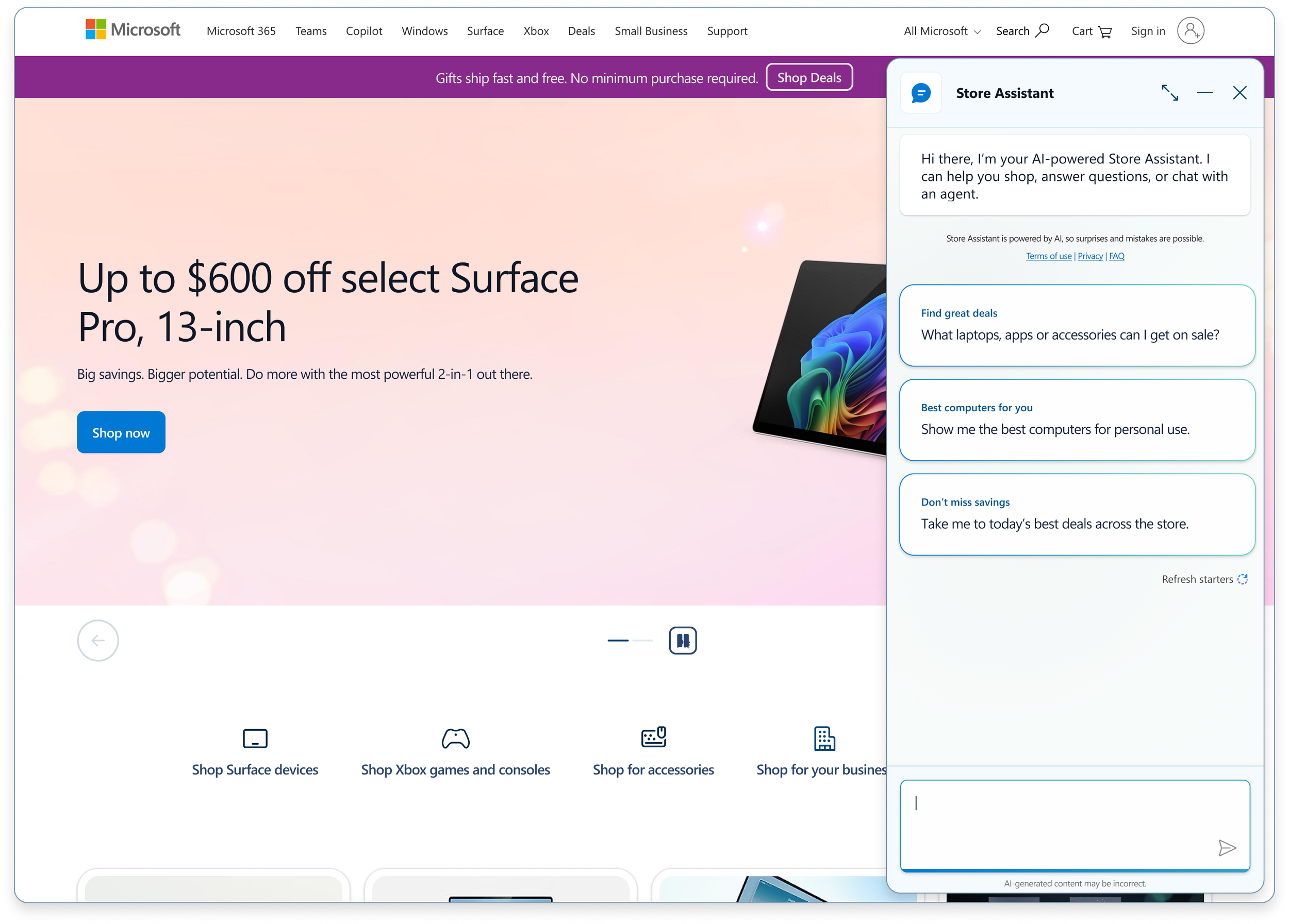
📌 PROJECT SCOPE
Company: Microsoft
Timeframe: Series of studies spanning 6+ months
My Role: Lead UX Researcher
Team: Product Manager, UX Designers, Copywriter, Developers, Leadership
Method: Foundational interviews, unmoderated usability tests, scaled surveys
Tools: Usertesting, Optimal Workshop, Figma, Excel
Background
The Opportunity
As Microsoft introduced AI into the Store experience, the team faced a critical challenge:
How do we integrate AI into a high-stakes shopping journey—without breaking trust, increasing friction, or hurting conversion?
The key challenges were:
Users did not yet trust AI for purchase decisions
AI behaviors often didn’t match user expectations (search vs. assistant)
Technical language and UI patterns introduced friction and confusion
AI risked interrupting—not supporting—the shopping journey
My Role
I led end-to-end UX research to integrate AI into the Microsoft Store experience, shaping how AI supports users across discovery, product evaluation, and purchase decisions.
Led end-to-end UX research (planning → execution → synthesis → recommendations)
Designed and ran foundational, evaluative, and preference studies
Partnered with product, design, and conversion teams
Translated insights into actionable product and experimentation recommendations
My Research Approach
1. Align on Decisions, Not Just Questions
Before defining a study, I partner closely with cross-functional stakeholders, including product managers, designers, data science, and leadership, to align on the decisions the research needs to inform.
This includes clarifying:
Business objectives (e.g., increase engagement, reduce drop-off, improve conversion quality—not just volume)
Decision points (what will change depending on the outcome of this research?)
Hypotheses and assumptions already held by the team
Constraints (timeline, technical feasibility, experimentation roadmap, and design maturity)
Rather than treating this as a one-time intake, I facilitate working sessions to co-create the research direction. This ensures:
Stakeholders see their perspectives reflected in the study design
Early buy-in on scope and methodology
Alignment on what “actionable” will look like before the work begins
I also involve stakeholders in test plan reviews and pilot sessions, which builds trust in the rigor of the approach and reduces downstream skepticism of findings.
2. Design Studies Around Decisions, Not Methods
I don’t start with a method—I start with the decision and design a study (or set of studies) that will generate the right level of evidence to support it.
My study design considerations include:
Product maturity: concept exploration vs. optimization of a shipped experience
Type of signal needed: behavioral (what users do), attitudinal (what they say), or preference (what they choose)
Risk level of the decision: reversible vs. high-impact/irreversible
Speed vs. rigor tradeoffs: when directional insight is sufficient vs. when statistical confidence is required
For this work, I designed a multi-method research program rather than a single study:
Foundational qualitative research
Semi-structured interviews to uncover mental models, trust drivers, and unmet expectations. This informed the problem framing and identified key areas of friction.Iterative prototype testing (lo-fi → hi-fi)
Rapid evaluative studies to de-risk design decisions before engineering investment. I structured tasks to simulate real decision-making contexts rather than isolated interactions.Task-based usability studies
Moderated sessions focused on end-to-end flows, capturing both success rates and points of hesitation or breakdown.Quantitative preference testing
Designed to validate language, naming, and UI variants at scale, ensuring that observed qualitative patterns held across a broader sample.
Each method was intentionally sequenced to progress from exploration → validation → optimization, allowing the team to build confidence incrementally.
3. Triangulate Signals to Build Confidence
I rarely rely on a single method or dataset. Instead, I design research programs that allow for triangulation across multiple signal types, strengthening the reliability of recommendations.
I synthesize across:
Qualitative insights → Why users think or feel a certain way
Behavioral observations → What users actually do in context
Quantitative data → How widespread or significant a pattern is
For example, language decisions (e.g., “Options” vs. “Configuration”) were validated through:
Quantitative preference rankings showing clear directional alignment
Qualitative feedback indicating differences in perceived complexity and cognitive load
Observed hesitation and misinterpretation during usability tasks
This layered approach reduces the risk of over-indexing on any single data source and enables me to make more defensible, high-confidence recommendations.
4. Craft Neutral, Decision-Oriented Study Design
I design studies to minimize bias and maximize signal quality.
This includes:
Writing non-leading, behaviorally anchored questions
Structuring tasks around realistic scenarios rather than abstract prompts
Randomizing stimuli and controlling for order effects in comparative studies
Clearly defining success metrics upfront (e.g., task success, time on task, confidence, error rates)
I also ensure that every question and task ties back to a specific decision or hypothesis, avoiding exploratory drift that doesn’t translate into action.
5. Drive Alignment Through Insight Activation
I see research as successful only when it drives decisions—not just when it delivers insights.
To ensure impact, I:
Translate findings into clear, prioritized recommendations tied to business outcomes
Frame insights in terms of risk reduction, opportunity size, and user impact
Deliver outputs tailored to different audiences:
Deep-dive reports for product and design
Executive summaries highlighting key decisions and tradeoffs
Partner with PMs and designers post-readout to integrate findings into roadmaps, experiments, and design iterations
I also create traceability between insights and decisions, so teams can clearly see how research influenced outcomes.
Collective Cross-Research Findings
Across 30+ studies, one consistent signal emerged: AI succeeds when it behaves like infrastructure that adapts to the user, not a system that asks users to adapt to it.
Adoption, trust, and perceived value are driven by control, accuracy, transparency, and familiarity.
Users are open to AI across the Microsoft ecosystem-but only when it is clearly scoped, visibly trustworthy, and aligned with existing mental models. Whenever AI behavior conflicts with how people expect shopping, browsing, or support to work-confidence drops sharply.
Highlighted Studies
Foundational AI Trust & Expectations
Goal
Understand how users perceive AI in a shopping context and what drives trust versus skepticism.
Key Research Questions
What would make you trust an AI assistant when shopping?
How do you expect AI to help you during your purchase journey?
Would you prefer AI, traditional navigation, or a mix of both?
What would you do after receiving AI recommendations?
Key Findings
Trust is driven by:
Accuracy of information (pricing, specs)
Transparency (sources, reasoning)
Memory and personalization
Users expect AI to function at a Copilot-level of intelligence, not a basic chatbot
Different formats serve different needs:
Full-page AI → exploration
Inline/side chat → decision support
Outcome / Impact
Defined AI experience principles used across the product:
Flexible AI formats (full-page + inline)
Emphasis on transparency and accuracy
Influenced AI integration strategy across homepage, PDP, and configurator
Drove follow-up research on error handling, memory persistence (48-hour chat history), and AI recognition through iconography and clear labeling.
“I expect it to really leverage all of my preferences, purchasing history, returns..I mean really all of it, to give me the best advice possible. In some ways, I expect it to be even better than ChatGPT.”
“I’m hoping to goodness it’s a decent bot that will actually get me where I need to go. Because again, same thing with bots. Very unreliable. Usually they’ll tell you to you have to call in, or be connected to somebody or something like that, because the initial one can’t help you. And they frequently misinterpret what you’re saying, so it’s usually a last-ditch effort.”
“Another glorified chatbot. I want true personalization- use my data, don’t just restate the page.”
Error States & Unexpected Responses
Goal
Understand how AI should respond to failures to maintain user trust and continued usage.
Key Research Questions
Understand what language and tone feel trustworthy after the AI makes a mistake
Which recovery strategies (e.g. transparency, actionable next steps) maintain willingness to continue using the AI
Key Findings
When encountering error states, users expect follow-up questions that clarify their needs and priorities
Transparent messaging (e.g., out-of-stock scenarios), paired with alternative suggestions and guided prompts, helps maintain trust and encourages continued engagement
Outcome / Impact
Introduced dynamic follow-up questions earlier in the experience to better capture user intent
Implemented alternative recommendations in a carousel format when products are unavailable
Designed continuous prompting strategies to encourage ongoing exploration and support decision-making
“Obviously it’s disappointing to know that something that you like is out of stock, but the fact that it is offering me similar suggestions is definitely helpful as well.”
“So I appreciate that it’s giving me similar suggestions and it’s prompting me to give me even more personalized suggestions by asking me this additional question that says what features are most important to you?”
“It should ask additional follow up questions, and find out what’s most important to me. If it can find out that screen size is most important, it can start recommending the largest screen size, and I don’t know if that’s true from this suggestion yet. It could have been more helpful by asking a follow-up question directly in this response instead of going on to give me a suggestion.”
AI Assistant Naming & Trust
Goal
Determine which assistant name best balances user preference, clarity, and trust.
Key Research Questions
Which name best represents what this assistant does?
Which name feels most trustworthy?
Which would you be most likely to interact with?
Key Findings
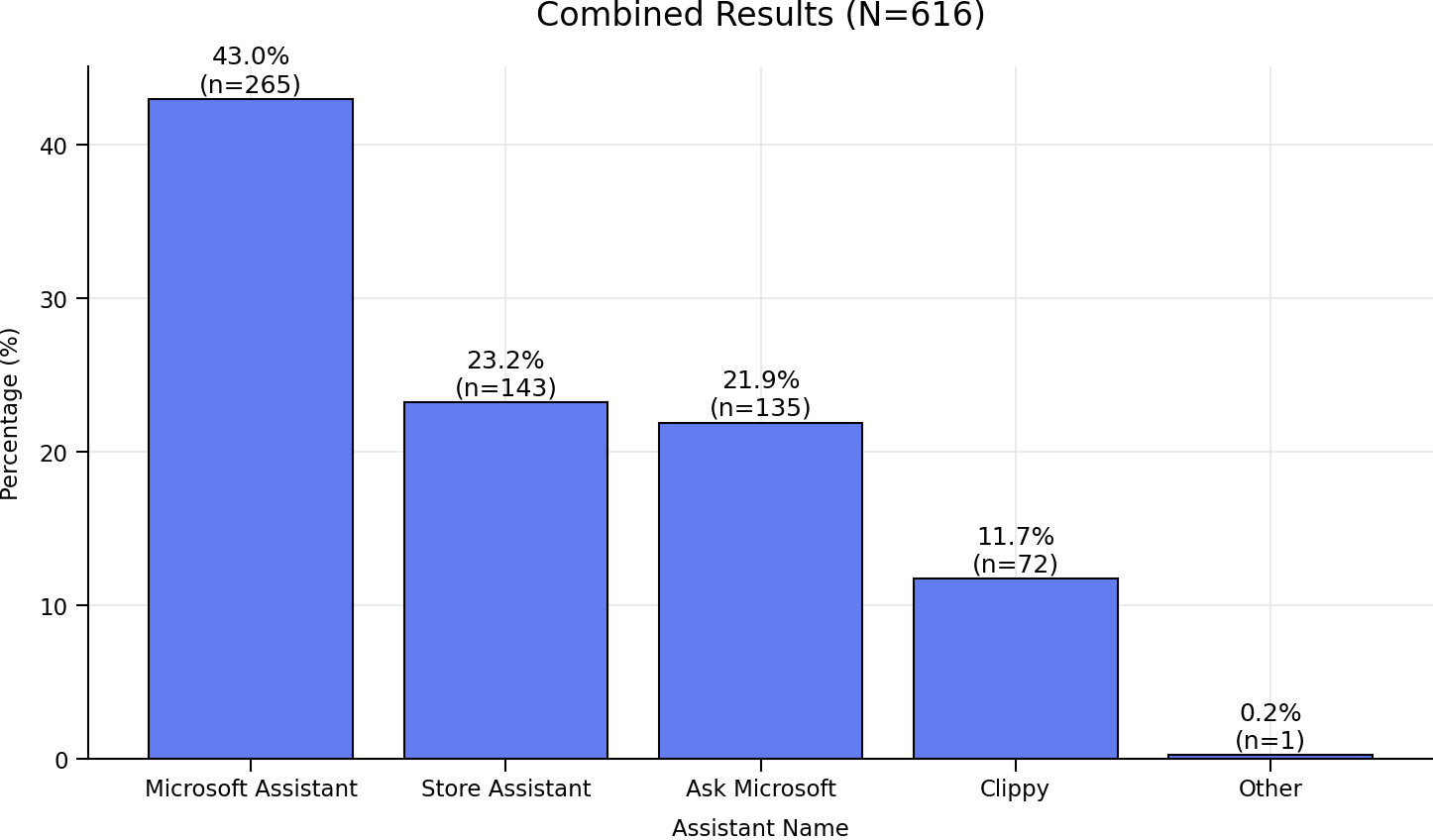
“Microsoft Assistant” was preferred by 49% of users
“Store Assistant” scored highest on trust and clarity
More playful names (e.g., “Clippy”) were perceived as less credible
Outcome / Impact
Recommended A/B testing top-performing names
Helped align stakeholders on:
Balancing brand vs. trust
Avoiding novelty that reduces credibility
Configurator Language Optimization
Goal
Reduce friction in product customization by identifying the most clear and accessible terminology.
Key Research Questions
Which term is easiest to understand?
Which feels most natural or relatable?
Which would you expect to click when customizing a product?
Key Findings
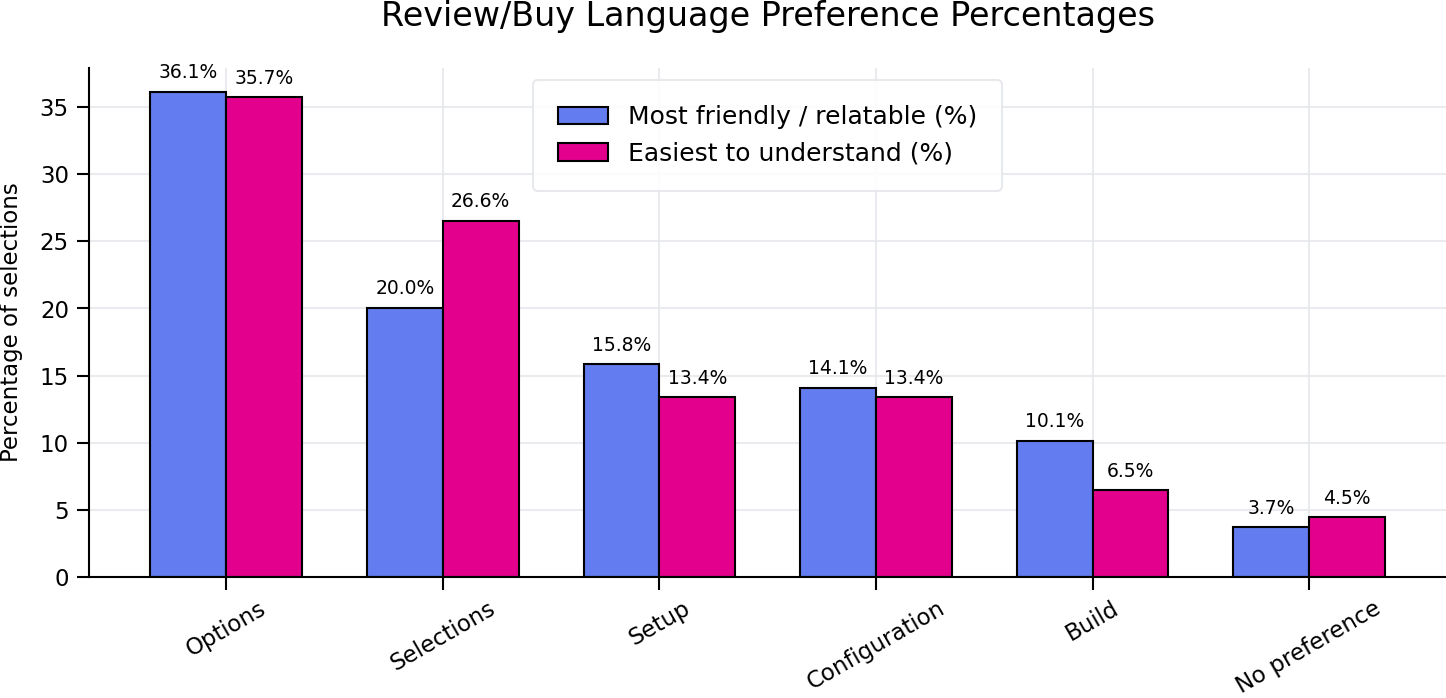
“Options” ranked highest for:
Ease of understanding
Friendliness / relatability
“Configuration” was perceived as:
Most technical
Highest cognitive load
Users strongly preferred simple, everyday language over technical terms
Outcome / Impact
Drove adoption of simplified language strategy across flows
Reduced friction in:
Compare / Customize
Review / Buy experiences
Influenced copy decisions at scale across the product
AI Recognition & Signaling
Goal
Understand how users recognize AI features and what drives recognition at the entry point.
Key Research Questions
How do users identify something as AI?
Does iconography improve recognition and trust?
What cues to users rely on most?
Key Findings
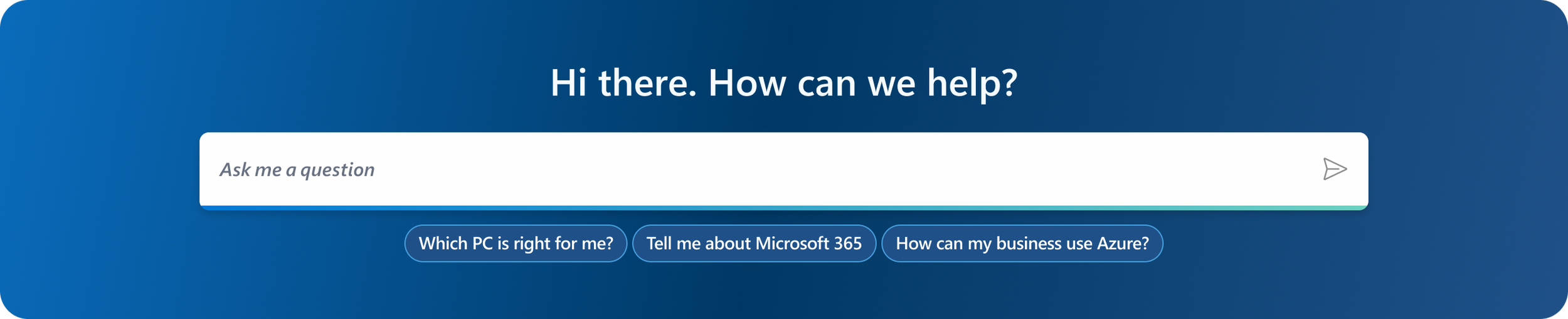
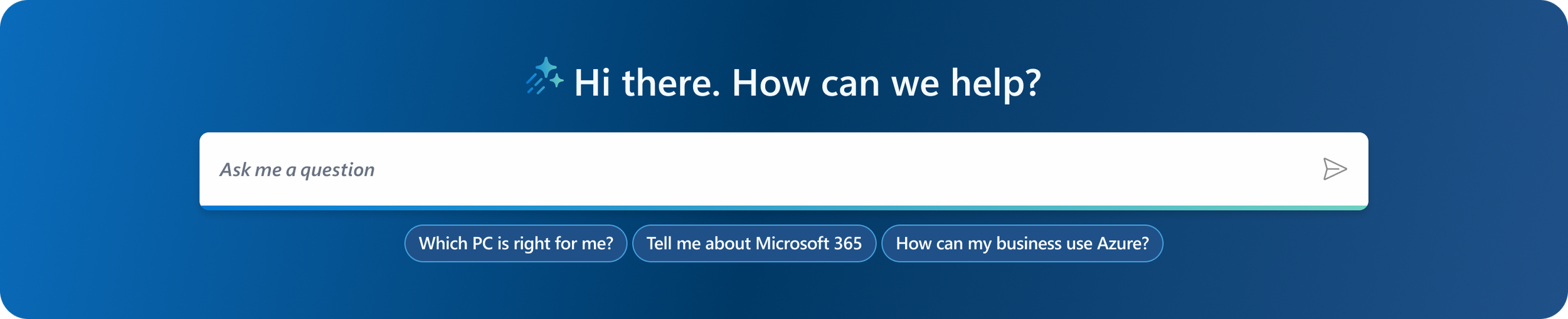
The sparkle icon improved perceived value and recognition, but was not sufficient as a standalone indicator
Users relied more heavily on explicit copy, prior experience, and contextual cues to understand AI functionality
Icon effectiveness varied based on placement and supporting context
Outcome / Impact
Reinforced that AI must be explicitly labeled—not implied
Informed a follow-up study on copy, which found that including ghost text such as“Ask me anything — your AI-powered assistant” significantly improved AI recognition and clarity
Established a core design principle:
→ Icons support recognition, but clear, explicit copy is what drives understanding, trust, and ultimately adoption

Reflection
Driving Product Impact
Integrated AI across the end-to-end shopping journey, reducing friction at key decision points and improving clarity and usability.
Scaling Research Through Systems
Established a repeatable research model (Intake → Study → Insight → Experiment) that connected insights directly to product decisions and experimentation.
Aligning Teams Around User Insight
Created a shared understanding of AI’s role, design principles, and user expectations, enabling consistent and confident decision-making.
Bridging Insight to Action in AI
Transformed research into a decision-making system—linking user needs to product strategy and helping teams navigate ambiguity in AI with confidence.